
Thinking outside the bounding box
StitchPress started with a simple frustration: charting tools treat stitches as clip art, and their meaning gets lost in the process. A double crochet is not just an image — it has proportions, it belongs to a round, and it should behave that way in an editor.
StitchPress is in active development, with new features and bug fixes rolling out every week, but it's not quite ready for the wider fiber arts community yet. Still, we want to share some of the features we're excited about with you.
This first deep dive is about the stitches themselves.
The trouble with bounding boxes
A lot of crochet designers use Adobe Illustrator as their main tool for creating crochet diagrams. It's flexible, but it wasn't designed with crochet charts in mind. Other crochet charting tools are influenced by Illustrator to some extent, and most of them have one thing in common: the transform bounding box.
The bounding box is the logical choice in a vector drawing program like Adobe Illustrator or Inkscape, but not so much when it comes to crochet charts. If you've used Stitchworks before, you know that when you click a stitch, a dotted rectangle appears, and every change you make to the stitch is relative to that rectangle rather than to the stitch itself. The same goes for newer tools like Stitch Fiddle (in its freeform crochet editor) and Crochet Chart.
Tops and bases
For StitchPress, we took a step back and thought outside the box (pun very much intended). A bounding box shouldn't be the only way to edit a crochet stitch. Stitches aren't just images you drag around; they carry meaning. For example, the bottom of a double crochet symbol should point at the spot in the previous round (or row) where it's worked. And the tip, where the crossbar sits, is where the next round (or row) will be worked.
With this in mind, we came up with a different approach: the top-and-base system. Instead of a generic bounding box, every stitch is broken down into its top(s) and base(s), like this:
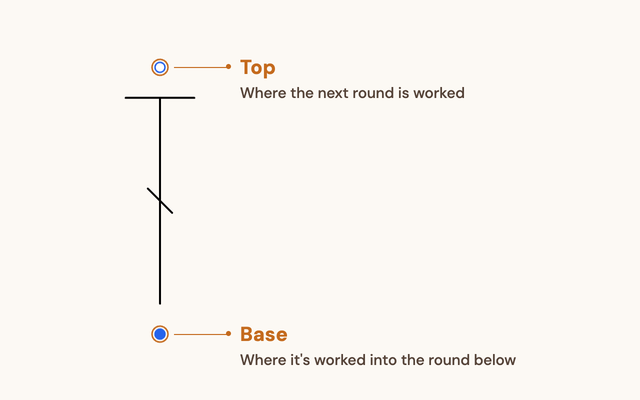
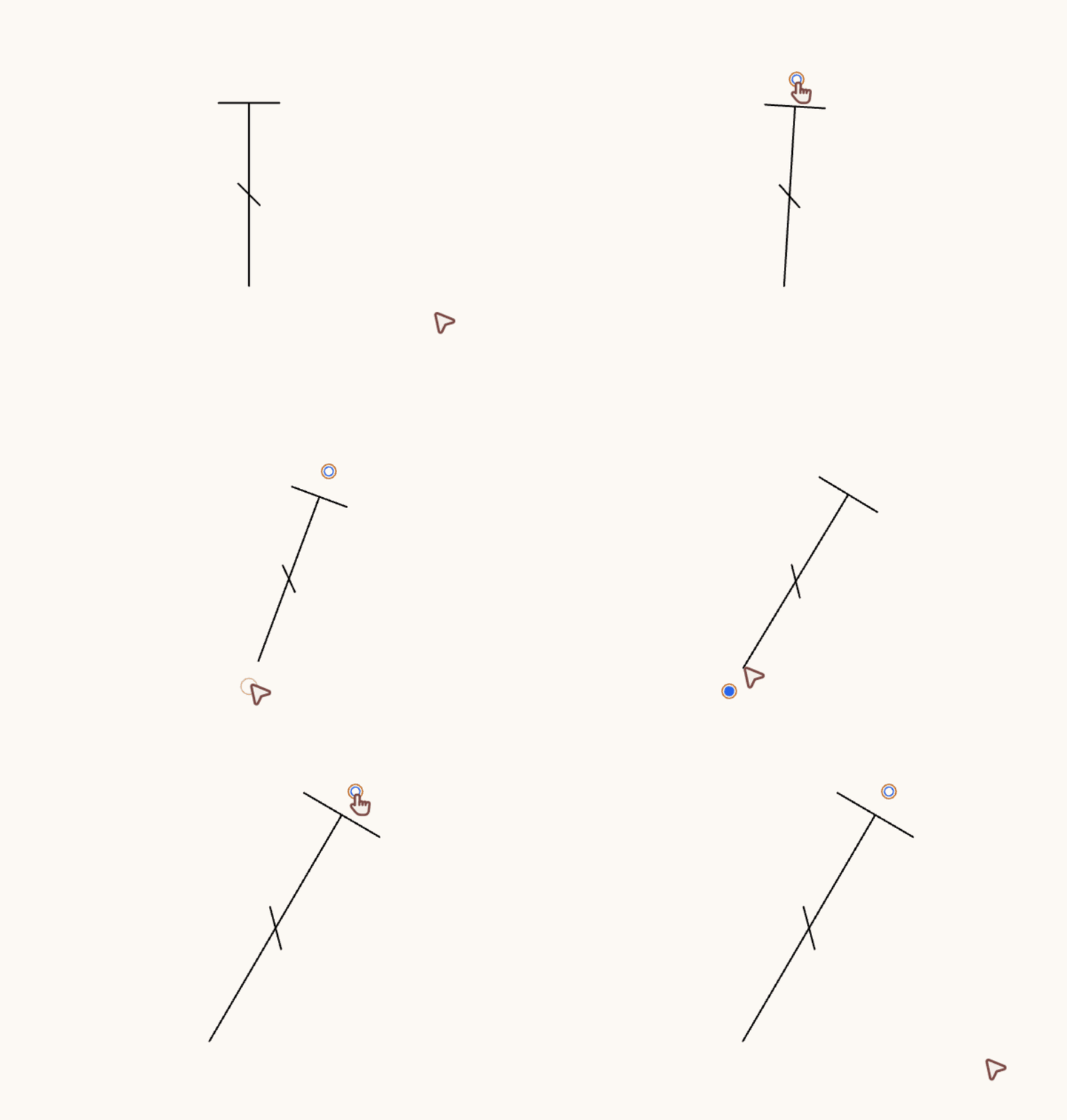
The controls sit directly on the top and base handles. To move a stitch's top or base, you drag that handle into place — no rotating a bounding box and trying to figure out where the center of rotation is. Then there's the stitch's length: with a bounding box, you often end up adjusting the scale and the rotation one at a time, only to find that fixing one throws off the other.
When a bounding box still makes sense
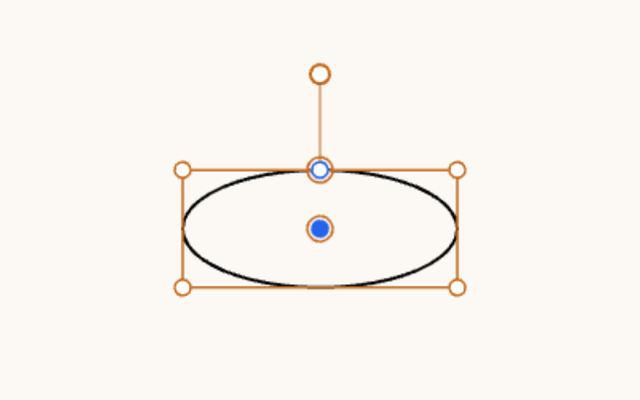
Every crochet stitch in StitchPress is made of top(s) and base(s), but we do think a bounding box is still useful in some cases. For a stitch like the chain, keeping its scale fixed while you rotate it is key to avoiding unintuitive transformations. So even though a chain still has a base and a top under the hood, you edit it with a bounding box.
What else tops and bases give us
Building stitches out of tops and bases has a few other benefits:
Legs can have different lengths. With a single image for an increase or a decrease, it's hard to keep each leg where it's actually worked, because every leg is drawn at a fixed length, and scaling one leg scales all the others with it. In StitchPress, an increase (one base, several tops) stores each top separately, so every top can sit in its own position without affecting the others.
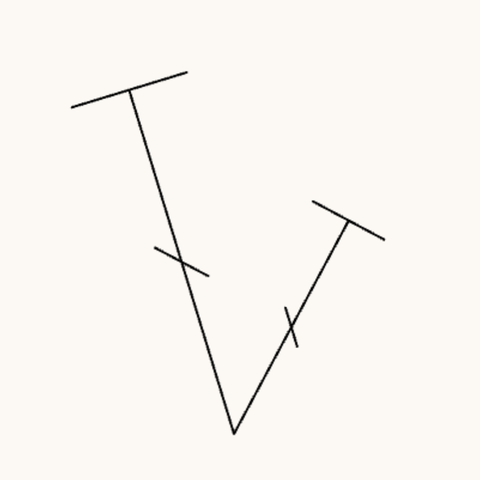
Increases and decreases are parametric. A 2-dc increase or a 3-dc increase is drawn on the spot, without anyone having to create an "image" of each one beforehand. This one is more of a benefit for us as the developers of StitchPress ;) It means we can support increases and decreases up to a certain number of stitches without redesigning the stitch symbols.
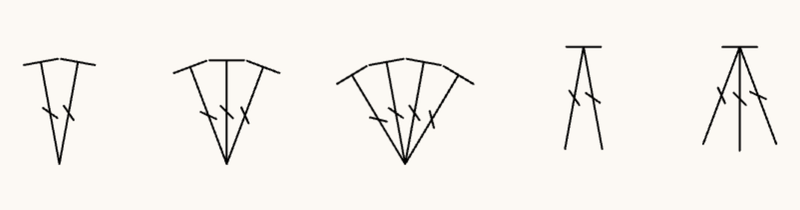
Rendering is parametric, too. All we need to draw a stitch is the positions of its top(s) and base(s), so stitch symbols can be customized. You could define how a stitch looks — say, in a more hand-drawn style — once, and have it carry over to increases and decreases as well. This is planned for the future, to give crochet diagrams a more personal touch.
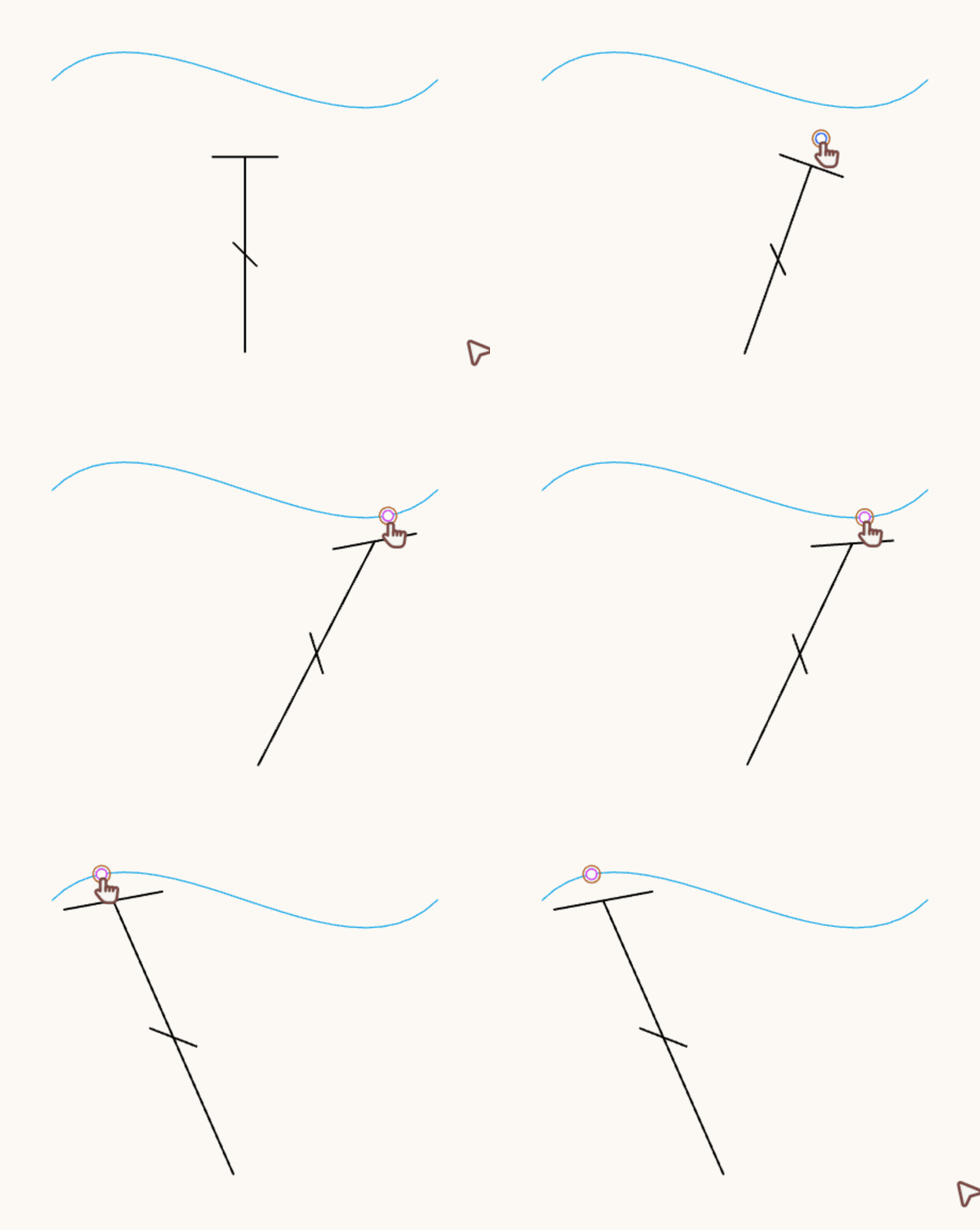
One feature in StitchPress already builds on this: following a guide's tangent. When you snap the top of a stitch with a crossbar (like a double crochet) to a guide, you can toggle whether the crossbar follows the guide's tangent at the snapping point. Here's what that looks like:
That wraps up our first deep dive! Stay tuned for the next one, where we'll look at how StitchPress keeps stitches organized with guides.
StitchPress is currently in pre-alpha, and we're actively looking for crochet diagram designers to help shape the experience. If you're interested and we haven't reached out to you yet, email us at contact@kinnet.studio. If you'd like to follow along with the alpha and beta tests, join the waitlist: